Sunday, November 22, 2009

Tips: Overlapping Polygons Display Order

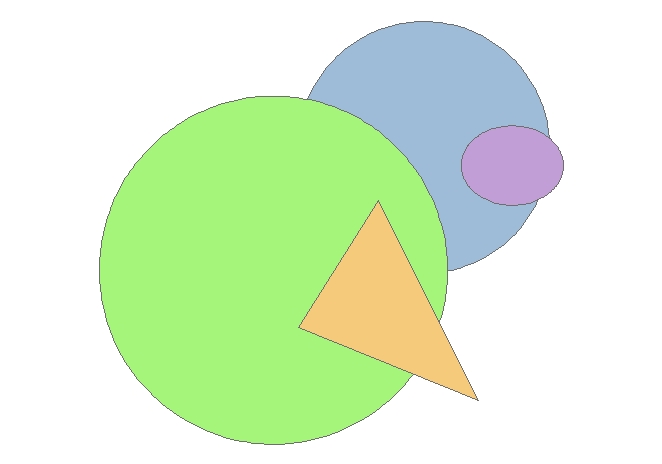
Recently someone asked me how to change the display order of overlapping polygons (like region topology) from an SDE layer in ArcMap. The problem was a smaller polygon underneath a larger one was not shown when the unique values of the dataset were symbolized using a solid fill. Like this:


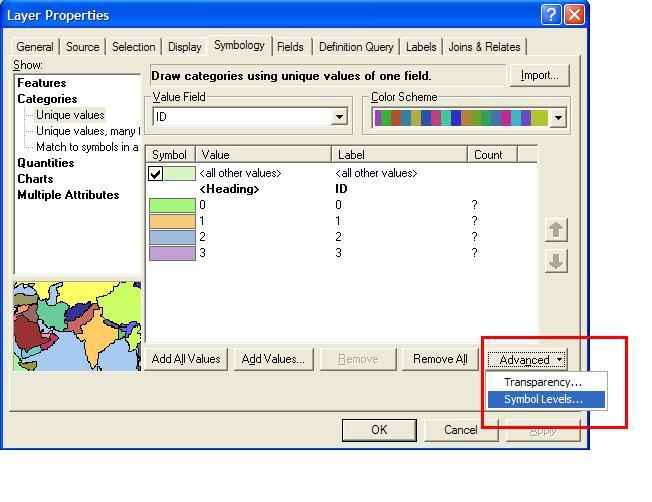
The solution isn't as intuitive as it could be. For ArcGIS, ArcMAP 9x the display order of the polygons can be changed in > LAYER PROPERTIES> SYMBOLOGY> ADVANCED> SYMBOL LEVELS...>


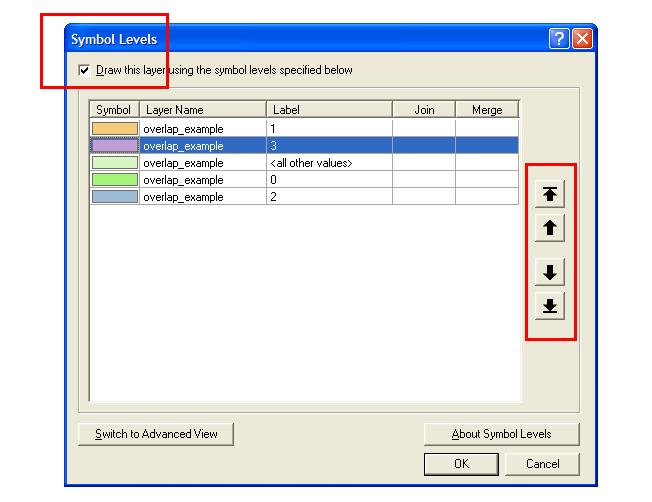
Check the box next to >Draw this layer using symbol levels specified below and use the up and down arrows on the right to toggle the display order of your polygons layer values.


The polygons are displayed in the order selected in the symbol levels window. See...

For users of ArcGIS 8x the location
of the ADVANCED>SYMBOL LEVELS
menu is a little hidden and is found by
right clicking LAYERS in the
Table of Contents.

Network West Midlands - Live Bus, Train and Metro Map

Network West Midlands - Live Bus, Train and Metro Map
Interactive Travel Map - this is information overlaid on to Google Maps showing live information from http://www.networkwestmidlands.co.uk/

The Interactive Live Map shows:
  • Bus stops (real time bus timetables, where available) rail stations (train departure and arrival times) and Metro stops.
  • See forthcoming departures (live for rail and bus)
  • Link through to full timetables relevant for each station and stop
  • See the 8-letter bus stop code for a particular bus stop.
The map functions:
  • Search box Type a road, town or village, postcode, bus stop name or bus stop code list matching bus stop results in the left panel.
  • Map top strip Tick/untick a checkbox to show/hide those map icons.
  • Map & markers You can pan, zoom and scroll using your mouse and the Google map controls (and the small map view in the bottom right-hand corner).
  • Left side links Select Rail or Metro to list local rail or metro stops
  • Left panel Bus stops matching your search are displayed as lists of links.
  • Quicklist Moves the map to an locality on the drop-down list.

Google Street View Mexico Arrives

Google Street View Mexico Arrives


Mexico City

Monterrey
Guadalajara
Puerto Vallarta
Cancun
Playa del Carmen
Cozumel

nice views on the Google Maps Mania Blog
http://googlemapsmania.blogspot.com/2009/11/mexico-gets-street-view.html

SuperGeo Develop Biodiversity GIS

SuperGeo Technologies has developed a Biodiversity GIS application for the Endemic Species Research Institute, which will enable users to integrate survey data from different individuals, groups or websites. This project aims to offer users a more convenient query interface, data management and survey tools and to attract users to supply and utilise more valuable survey data.
supergeoThrough the Internet platform, users are able to connect to other databases. The personalised survey data management software offers users customised management functions. The website also provides the links to statistical information and a distribution chart of survey data, as well as the survey table sharing function. In addition, a contribution quantification function is created for users to increase their willingness and convenience to contribute survey data. Every user could therefore be a biological surveyor.
 
The system is developed by means of across-browser in order to support the mainstream browsers including Internet Explorer of Microsoft, Firefox of Mozilla, Safari of Mac and Chrome of Google. The platform provides three functions: query species; uploading data; and user information.
 
The integrated application of Internet GIS and biodiversity data can help users understand biodiversity distribution efficiently. The system also contributes to land protection and conservation and assists the prediction and alarm mechanism for climate change and short-term environment change. The regional ecological features can also be highlighted to provide the Government with the regional feature information to increase citizen's green income.

Broadband Trends Map (UK)

Using the 'Top 10 Broadband Speed Test'
is a free-to-use speed (and compare) testing service that analyses your broadband speed in seconds. It can measure speeds on every type of broadband connection whether ADSL, cable / fibre-optic or mobile broadband (3G).

Broadband Trends Map
  • Test your broadband speed in seconds
  • See your neighbours' speeds with Broadband StreetStats™
  • Find out the fastest broadband provider in your area!