Sunday, November 22, 2009

Tips: Overlapping Polygons Display Order

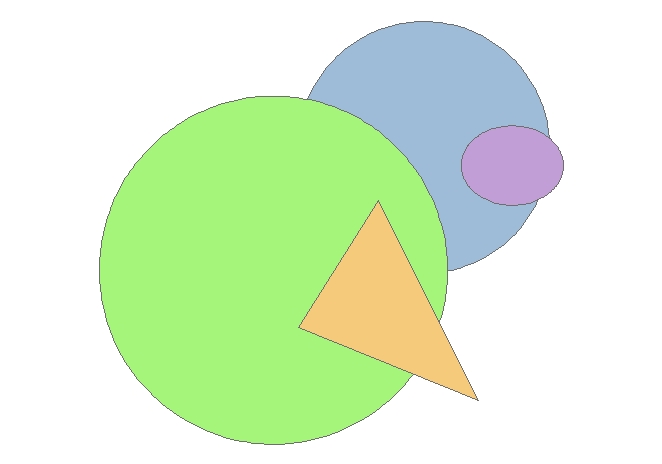
Recently someone asked me how to change the display order of overlapping polygons (like region topology) from an SDE layer in ArcMap. The problem was a smaller polygon underneath a larger one was not shown when the unique values of the dataset were symbolized using a solid fill. Like this:


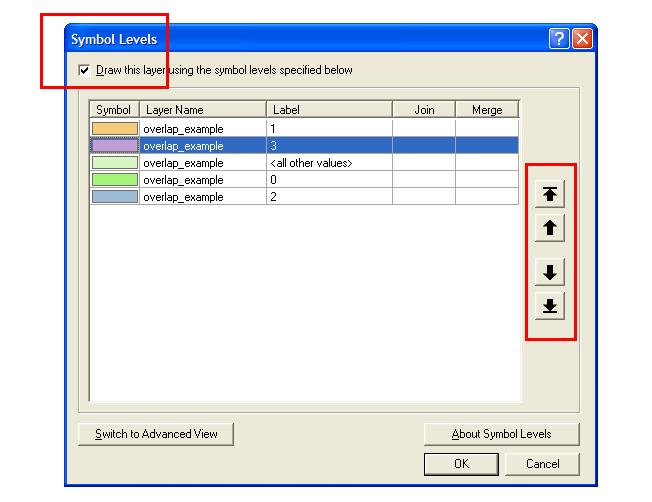
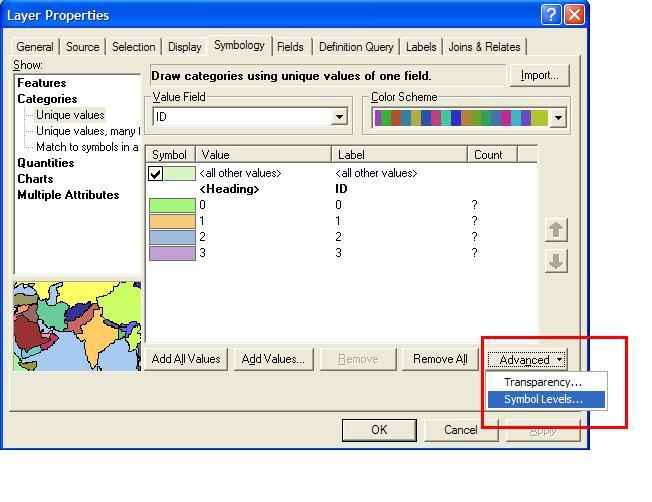
The solution isn't as intuitive as it could be. For ArcGIS, ArcMAP 9x the display order of the polygons can be changed in > LAYER PROPERTIES> SYMBOLOGY> ADVANCED> SYMBOL LEVELS...>


Check the box next to >Draw this layer using symbol levels specified below and use the up and down arrows on the right to toggle the display order of your polygons layer values.


The polygons are displayed in the order selected in the symbol levels window. See...

For users of ArcGIS 8x the location
of the ADVANCED>SYMBOL LEVELS
menu is a little hidden and is found by
right clicking LAYERS in the
Table of Contents.

Network West Midlands - Live Bus, Train and Metro Map

Network West Midlands - Live Bus, Train and Metro Map
Interactive Travel Map - this is information overlaid on to Google Maps showing live information from http://www.networkwestmidlands.co.uk/

The Interactive Live Map shows:
  • Bus stops (real time bus timetables, where available) rail stations (train departure and arrival times) and Metro stops.
  • See forthcoming departures (live for rail and bus)
  • Link through to full timetables relevant for each station and stop
  • See the 8-letter bus stop code for a particular bus stop.
The map functions:
  • Search box Type a road, town or village, postcode, bus stop name or bus stop code list matching bus stop results in the left panel.
  • Map top strip Tick/untick a checkbox to show/hide those map icons.
  • Map & markers You can pan, zoom and scroll using your mouse and the Google map controls (and the small map view in the bottom right-hand corner).
  • Left side links Select Rail or Metro to list local rail or metro stops
  • Left panel Bus stops matching your search are displayed as lists of links.
  • Quicklist Moves the map to an locality on the drop-down list.

Google Street View Mexico Arrives

Google Street View Mexico Arrives


Mexico City

Monterrey
Guadalajara
Puerto Vallarta
Cancun
Playa del Carmen
Cozumel

nice views on the Google Maps Mania Blog
http://googlemapsmania.blogspot.com/2009/11/mexico-gets-street-view.html

SuperGeo Develop Biodiversity GIS

SuperGeo Technologies has developed a Biodiversity GIS application for the Endemic Species Research Institute, which will enable users to integrate survey data from different individuals, groups or websites. This project aims to offer users a more convenient query interface, data management and survey tools and to attract users to supply and utilise more valuable survey data.
supergeoThrough the Internet platform, users are able to connect to other databases. The personalised survey data management software offers users customised management functions. The website also provides the links to statistical information and a distribution chart of survey data, as well as the survey table sharing function. In addition, a contribution quantification function is created for users to increase their willingness and convenience to contribute survey data. Every user could therefore be a biological surveyor.
 
The system is developed by means of across-browser in order to support the mainstream browsers including Internet Explorer of Microsoft, Firefox of Mozilla, Safari of Mac and Chrome of Google. The platform provides three functions: query species; uploading data; and user information.
 
The integrated application of Internet GIS and biodiversity data can help users understand biodiversity distribution efficiently. The system also contributes to land protection and conservation and assists the prediction and alarm mechanism for climate change and short-term environment change. The regional ecological features can also be highlighted to provide the Government with the regional feature information to increase citizen's green income.

Broadband Trends Map (UK)

Using the 'Top 10 Broadband Speed Test'
is a free-to-use speed (and compare) testing service that analyses your broadband speed in seconds. It can measure speeds on every type of broadband connection whether ADSL, cable / fibre-optic or mobile broadband (3G).

Broadband Trends Map
  • Test your broadband speed in seconds
  • See your neighbours' speeds with Broadband StreetStats™
  • Find out the fastest broadband provider in your area!

Google Maps JavaScript API v3 - Now with Directions

**Remember Google Maps JavaScript API v3 is designed to be super lightweight for mobile devices

This makes mapping for mobile devices a lot more useful

New Directions (Walking or Driving) in London - Google Maps API V3
New Directions (Walking or Driving) in London - Google Maps V3

@mapperz example above
http://mapperz.googlepages.com/google_mapv3_directions.html

With a Directions Panel
http://mapperz.googlepages.com/google_mapv3_directions_panel.html


Code:
New required parameters

var directionDisplay;
var directionsService = new google.maps.DirectionsService();

Set Start and End locations:

function calcRoute() {
var start = document.getElementById("start").value;
var end = document.getElementById("end").value;
var request = {
origin:start,
destination:end,

Travel Modes:

travelMode: google.maps.DirectionsTravelMode.WALKING
travelMode: google.maps.DirectionsTravelMode.DRIVING

Get the response from the Geocoder if both locations geocoded then display route between locations:

directionsService.route(request, function(response, status) {
if (status == google.maps.DirectionsStatus.OK) {
directionsDisplay.setDirections(response);


See the changelog
http://code.google.com/p/gmaps-api-issues/wiki/JavascriptMapsAPIv3Changelog

revelant links
Official documentation
http://code.google.com/apis/maps/documentation/v3/reference.html#DirectionsRenderer
http://code.google.com/apis/maps/documentation/v3/reference.html#DirectionsService

Offical Examples:
http://code.google.com/apis/maps/documentation/v3/examples/directions-simple.html
http://code.google.com/apis/maps/documentation/v3/examples/directions-panel.html

source:
http://groups.google.com/group/google-maps-js-api-v3/browse_thread/thread/ee7ce7cf8a872268?hl=en#

Saturday, November 21, 2009

Tips: ArcGIS Shortcut Keys

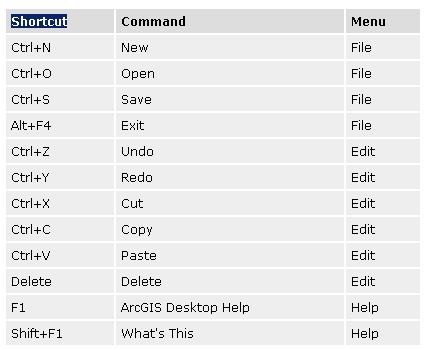
I always knew about shortcut keys in ArcGIS but as I have been transitioning myself away from command line I had almost started to forget that my keyboard even existed anymore. At a recent training session I was reminded that there are some very useful shortcut keys in the ArcGIS environment. To access a list of shortcut keys in ArcGIS go to ArcGIS Desktop Help and search for 'shortcut keys'. Among others there are shortcut keys for: editing in ArcMAP, common tasks in ArcGIS help, common functions in ArcMAP and you can even customize and create your own shortcuts.

Here's a quick teaser for some of the very common shortcuts in ArcMAP:

Problems

GIS in Bangladesh is also experiencing problems on the way to its development. The rapid changes and development of hardwares and softwares pose a serious problem in its upgradation when necessary. There is hardly any co-ordination among organisations using GIS in terms of users' needs, applications, procurement of new softwares and data gathering and exchange of data among the government organisations, research bodies and academic organisations. So far the geographers have demonstrated better skills in analysing GIS outputs in the form of maps. But the local experts at government level are mainly from a non-geography background. Besides, lack of availability of resources, institutional weakness, poor information base, lack of government initiatives, conflicting interests between donor agencies, lack of expertise -- all have constrained its march.

Pioneering role of universities

Almost all the universities of Bangladesh have installed GIS and have been formulating courses on GIS and setting up GIS labs for the purposes of education, training, certificate course, research and services, specially to develop degree-oriented academic curricula at graduate and post-graduate levels and to accomplish collaborative research works with local and foreign organisations and institutions

Present application in Bangladesh

Now GIS is being used in Bangladesh in planning and development purposes both in public and private sectors. At present there are more than 30 installations in the country and about half of them are operational (Rashid and Ali, 1997). Most of the GIS installations here are donor assisted and still operated by foreign experts with limited home personnel. Yet, recently a number of government and private institutions have installed GIS with their own finance and are utilising it for various purposes including resource management, research, policy and decision making etc.

GIS is now being used to generate readily accessible information on the land resources of the country for researchers, extension workers and decision-makers on land and agricultural resources management as well as agricultural development planning. This database constitutes the foundation for a new effort to develop a comprehensive multi scale GIS based Land Resources Information System (LRIS).

GIS based flood forecast models (MIKE-II) have recently been developed in Bangladesh. MIKE-II and its GIS interfaces are suitable for application at the planning, design, implementation and operation levels. The MIKE-II system is a valuable tool for determining flood control and drainage structure operation rules and providing inputs to flood preparedness programmes.

Arsenic researchers of the country are also applying GIS technology for detailed arsenic contamination mapping, modelling and related physical processes of arsenic contamination.

Setting of GIS in Bangladesh


GIS technology made its beginning in Bangladesh in 1991 through ISPAN (Irrigation Support Project for Asia and the Near East) for the FAP-19 (Flood Action Plan-19) Project. The organisation is now named as EGIS (Environment and GIS support projects for water sector planning). At the beginning there were only a few GIS installations, most likely numbering nine, in Bangladesh. Besides, the use of GIS was confined to the government offices only. There was extreme lack of GIS experts and personnel. Most of the GIS installations were run by foreigners. As a result, GIS use in Bangladesh was essentially expensive. LGED (Local Government Engineering Department) was first to use it in its different operations.

What is GIS (Geographic Information System)?


Maps have been used for thousands of years, but it is only within the last few decades that the technology has existed to combine maps with computer graphics and databases to create geographic information systems or GIS. The themes in the above graphic are only a small example of the wide array of information that can view or analyze with a GIS. GIS is used to display and analyze spatial data which are tied to databases. This connection is what gives GIS its power: maps can be drawn from the database and data can be referenced from the maps. When a database is updated, the associated map can be updated as well. GIS databases include a wide variety of information including: geographic, social, political, environmental, and demographic.